
EZStoredProc Download
| Installation File Name: | EZStoredProcSetup.exe |
| Version: | 2.0 |
| File Size: | 0.48 MB |
| Download Time: | Dial-up: 70 seconds DSL: 7 seconds |
| Requirements: | Windows 8/7/Vista/XP
(with .Net Framework 2.0) MS SQL Client Tools |

EZStoredProc has been awarded "100% CLEAN" Award by Softpedia.
Softpedia guarantees that EZStoredProc is 100% CLEAN, which means it does not contain any form of malware (spyware, viruses, trojans, backdoors, etc).
This software product was tested thoroughly and was found absolutely clean, therefore it can be installed with no concern by any computer user.
Installation Instructions:
Download the installation file (EZStoredProcSetup.exe) to your computer and double-click on it. Follow the instructions on the installation wizard to complete the installation process.
Please note that EZStoredProc requires MS SQL Client tools (i.e. Enterprise Manager or SQL Server Management Studio) and Microsoft .Net Framework 2.0 to run on your computer. If you do not have MS SQL Client tools installed, you will get an error message like below when you run the application:
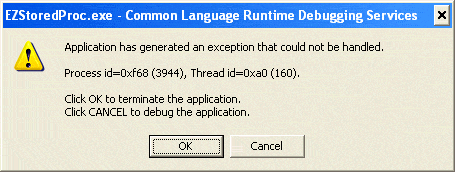
You will not get this error after you have installed the MS SQL Client tools.
EZStoredProc requires Microsoft .Net Framework
2.0 to run on your computer. If you have not installed Microsoft .Net Framework
2.0, the installation program will automatically download it for you. Since the
installation file for Microsoft .Net Framework
2.0 is quite large (23 MB), it might take up to one hour to download if you have a
dial-up Internet connection. It takes about 8 minutes to download for a DSL
connection.
If you already have Microsoft .Net Framework
2.0 installed on your computer, the installation program will not download it
again. It will install EZStoredProc only. Since .Net Framework
2.0 is pre-installed with Windows Vista, you will not have to download .Net
Framework
2.0 if you have Windows Vista.
You can check whether .Net Framework
2.0 is installed on your computer.
If you prefer to download and install Microsoft .Net
Framework 2.0
manually, please
click here to
download and install the Microsoft .Net Framework 2.0 installation
file (dotnetfx.exe).
After you have downloaded EZStoredProc's installation file, double-click on it to run it.
The installation
program will first download and install Microsoft .Net Framework 2.0 (if
needed). Then it will install EZStoredProc.
Once the installation process is completed, EZStoredProc will automatically be launched. If EZStoredProc is not launched automatically, you can launch the program by clicking Start, Programs, EZStoredProc, EZStoredProc. Or you can launch the program by double-clicking on the EZStoredProc icon on your desktop.
If you would like to purchase a license after trying the evaluation version of EZStoredProc, you can click on the Buy Now link to obtain the User Name and User Key that would lift the trial version's limitations.
The use of this software is subject to the terms of the license agreement. Please be assured that EZStoredProc does not contain any adware or spyware. Installing EZStoredProc on your computer will not affect its performance in any way.
| Supported Hardware |
| Intel/AMD processor. |
| Supported Operating Systems |
|
Microsoft Windows 11 Microsoft Windows 10 Microsoft Windows 8 Microsoft Windows 7 Microsoft Windows Vista Microsoft Windows XP |